Traktor is Native Instruments’ DJ software, known for powerful effects, flexible deck options and deep performance features. Its main version, Traktor Pro, has long been a favourite among electronic music DJs who want creative control beyond standard two-deck mixing. This guide covers what Traktor does and how to start using it.
Comparing the field first? Our roundup of the best DJ software puts Traktor in context. Here we focus on Traktor itself.
What makes Traktor different
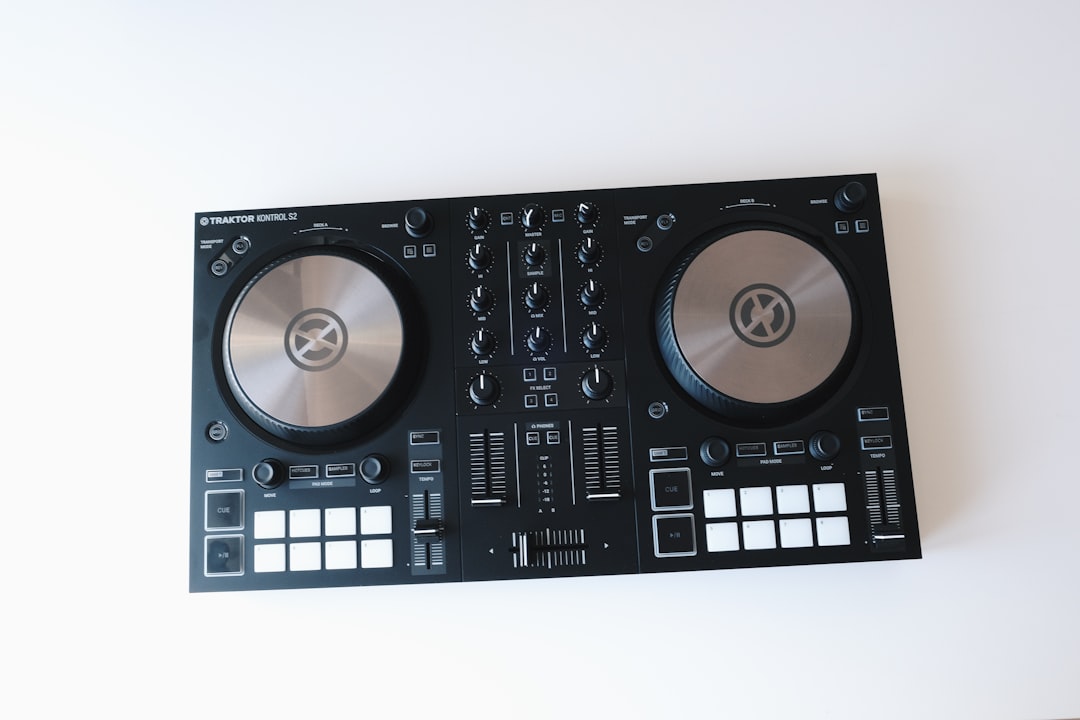
Traktor built its reputation on effects and flexibility. It offers a strong suite of FX, four-deck mixing, and creative tools that suit DJs who like to remix and layer on the fly rather than just blend two tracks. It pairs naturally with Native Instruments’ own Traktor Kontrol controllers, which are designed around its workflow.
Two standout features are worth knowing:
- Remix Decks: trigger loops, samples and one-shots live, turning a deck into a performance instrument.
- Stems: Traktor pioneered the Stem format, letting you control separate parts of a track — drums, bass, melody, vocals — independently. Learn more in our guide to DJ stems.
Hardware options
Traktor runs best with its native Traktor Kontrol controllers and audio interfaces, which map tightly to the software. It also works with some third-party hardware and supports DVS (digital vinyl) with the right interface and timecode vinyl for turntablists.
If you are choosing gear, see the best DJ controllers and the best 4-channel DJ controllers for options that suit Traktor’s four-deck workflow. Always confirm a controller’s Traktor support before buying, since mapping quality varies between native and third-party units.
Core features you will use
- Up to four decks: mix, layer and remix more than two tracks at once.
- Effects: a deep FX engine with chained and single-effect modes.
- Remix Decks and Stems: live sample triggering and per-part track control.
- Hot cues and loops: set jump points and loops for performance — see how to use loops when DJing.
- Key detection: analysis to support mixing in key harmonically.
Understanding Traktor’s effects engine
The FX engine is where Traktor earns most of its loyal following, so it is worth understanding how it is laid out. Traktor gives you multiple FX units, and each can run in one of two broad modes. In Group mode a single unit chains several effects together, so you can stack a delay, a reverb and a filter and ride them all from one set of controls. In Single mode that same unit dedicates itself to one effect but exposes more parameters, giving you finer hands-on control of, say, a single delay’s feedback and timing.
A practical way to learn the engine is to start with one unit assigned to one deck and a single, musical effect such as a filter or a beat-synced delay. Bring it in gradually with the dry/wet control rather than slamming it on at full strength, and pull it back out before it muddies the mix. Once that feels natural, experiment with assigning an FX unit across the master so a transition sweeps the whole mix, then graduate to chained effects in Group mode. Restraint matters more than raw quantity here: one well-timed effect on a build or breakdown reads far better on a dancefloor than several layered at once.
Getting started with Traktor
- Install Traktor from Native Instruments and set up your account.
- Connect your hardware so the controller maps to the software.
- Import and analyse your music for BPM, grids and key.
- Organise your collection into playlists — strong library organisation keeps performance smooth.
- Experiment with FX, Remix Decks and Stems once the basics feel comfortable.
Getting clean beatgrids
Almost every advanced Traktor feature — syncing decks, looping, triggering samples in time, slicing Stems — depends on an accurate beatgrid. When you import a track, Traktor analyses it for tempo and lays a grid of beat markers over the waveform. For modern, electronically produced music with a steady tempo, that automatic grid is usually spot on. For older recordings, live drumming or tracks with tempo drift, it can land slightly off, and a grid that is even a fraction out will make synced mixes slowly slide apart.
It pays to spot-check the grid on important tracks before you rely on them in a set. Zoom into the waveform, confirm the downbeat marker sits on the first kick, and check that the grid lines still line up with the beats near the end of the track. If they drift, adjust the grid manually and lock it so the correction sticks. A library of well-gridded, properly analysed tracks is the single biggest thing that makes Traktor feel stable and predictable when you are performing under pressure.
Common mistakes to avoid
A few habits trip up DJs who are new to Traktor:
- Leaning on Sync and ignoring your ears: Sync is a useful tool, but it only works as well as your beatgrids do. Keep beatmatching and phrasing by ear in your skill set rather than treating Sync as a substitute for them.
- Overloading the effects: stacking too many FX at once turns a transition into noise. Choose one or two effects per moment and use them with intent.
- Neglecting gain staging: letting channels clip into the red distorts the sound and ruins headroom. Set sensible levels and watch the meters so the mix stays clean.
- Skipping library organisation: a messy, unanalysed collection makes you hunt for tracks mid-set. Tidy playlists and tagging keep the focus on performance.
- Buying hardware without checking support: not every controller maps cleanly to Traktor. Confirm compatibility before you commit.
Who Traktor suits
Traktor is a strong fit for electronic music DJs who want creative, effects-heavy and remix-style performance, and for anyone drawn to Stems and four-deck mixing. It rewards DJs who like to build sets actively rather than simply transition between two tracks. If your goal is club gigs on Pioneer CDJs, rekordbox may suit better; if you want the broadest controller ecosystem, Serato is worth weighing too. Compare the big two in our Serato vs rekordbox guide.
Frequently asked questions
Is Traktor good for beginners?
Traktor can absolutely be used by beginners for standard two-deck mixing, and its core workflow is approachable. Its deeper features — Remix Decks, Stems and chained effects — reward more experienced DJs. Start with the basics and grow into the advanced tools as your skills develop.
What are Traktor Stems?
Stems are a track format Traktor pioneered that splits a song into separate parts such as drums, bass, melody and vocals. You can control each part independently while mixing, enabling creative transitions and on-the-fly remixing. See our guide to DJ stems for a fuller explanation.
Does Traktor work with non-Native Instruments hardware?
Traktor works best with Native Instruments’ own Traktor Kontrol gear, which maps natively. It also supports some third-party controllers and DVS turntable setups, though mapping depth varies. Confirm a specific controller’s Traktor support before buying if you are not using native hardware.
Do I need a controller to use Traktor?
No — you can run Traktor entirely with a keyboard and mouse, and it is a sensible way to learn the layout before spending on hardware. That said, a controller gives you tactile control over jog wheels, faders, EQ and FX that makes mixing far more fluid, so most DJs add one as soon as they are comfortable with the basics. A simple two-channel unit is plenty to start; you can step up to a four-deck controller later if Traktor’s multi-deck workflow becomes central to your sets.